
Last Tuesday, I wanted to download a 4K nature documentary to watch on my flight. I tried four different "free" downloaders. Three were complete scams - fake download buttons that led to ads. The fourth gave me a blurry 1080p video and called it "4K."
If you've been there, you know how frustrating it is.
Here's what I learned: genuinely free 4K downloads are rare. Most tools either charge you, add watermarks, or lie about the quality. After testing dozens of options, I finally found what actually works - and I'm going to be upfront about what's free and what's not.
Our tool gives you unlimited free audio downloads in all quality levels - from standard to highest quality, no restrictions, no daily limits. For HD and 4K video downloads, we offer Lite and Pro subscriptions. Plus, Pro members get a huge time-saver: videos with audio already combined, so you don't have to merge files yourself.
Whether you're a student saving lectures, a content creator studying competitors' work, or someone who just wants videos offline in the best quality possible, this guide shows you exactly how to do it.
What You Get:
- Free: All audio qualities, unlimited downloads (perfect for music, podcasts, interviews)
- Lite/Pro: HD and 4K video downloads
- Pro: Videos with audio pre-combined (saves tons of time)
- No software installation required
- Works on all devices
- No watermarks on downloads
Let me show you how it works.
How to Download YouTube Videos in 4K (Takes 30 Seconds)
I've downloaded probably 100+ videos using this method. Here's my exact process:
Step 1: Find Your Video
Go to YouTube and find the video you want. Want to check if it's actually 4K? While the video plays, click the settings gear icon and look at quality options. If you see "2160p" listed, you're good.
Quick reality check: not every YouTube video is uploaded in 4K. Newer videos from bigger creators usually are. Older videos? Probably not.
Step 2: Copy the Link
Click the "Share" button under the video and hit "Copy." That's it.
Alternative: just copy the URL from your browser's address bar. Both work fine.
Step 3: Paste the Link
Open our YouTube to MP4 converter in a new tab. You'll see a clean input box at the top - no clutter, no confusing options.
Paste your link in the box and click the "Download" button.
Step 4: Choose Your Format and Quality
Within seconds, you'll see two lists side by side:
- Left side: Video formats - 4K, 2K, 1080p, 720p, and more
- Right side: Audio formats - High quality, standard, different formats (MP3, M4A, etc.)
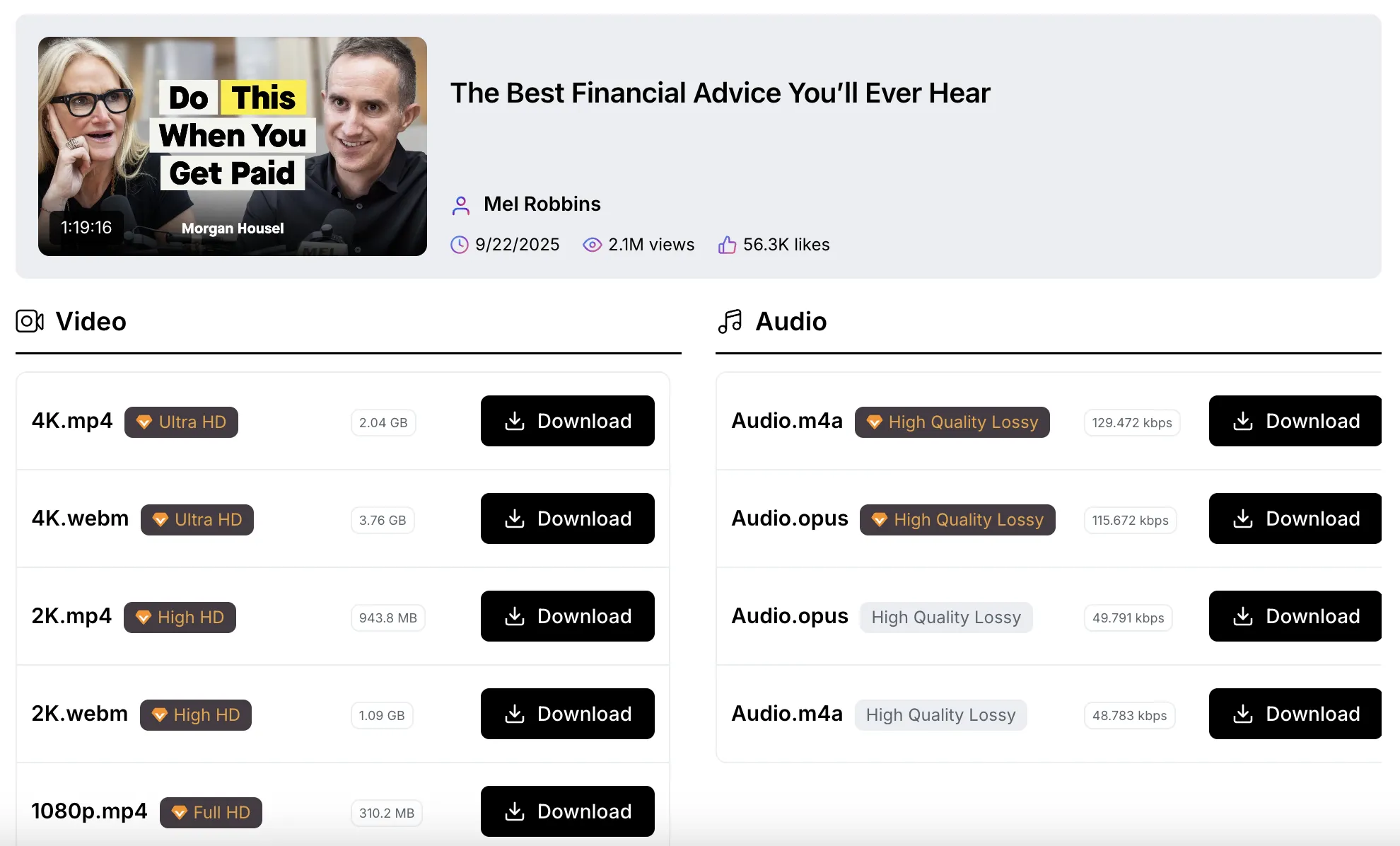
Each format shows the file size and quality badge. Audio downloads are completely free in any quality. For 1080p and higher video, you'll need a Lite or Pro subscription.
Step 5: Download
Click the "Download" button next to the format you want. The file saves to your device immediately.
That's the whole process. No "please wait 60 seconds," no countdown timers, no redirects to sketchy sites.
Understanding YouTube's Video & Audio System
Here's something that surprises most people: YouTube stores video and audio as separate files. This is how YouTube works behind the scenes - it's not our tool doing this.
Why Videos and Audio Are Separate
That's just how YouTube works. YouTube stores high-quality video and audio as separate files on their servers. When you stream on YouTube, your browser combines them automatically. When you download, you get the separate files.
When you download a YouTube video in high quality (1080p or higher), you're getting just the video part - no sound. You'd need to download the audio separately and combine them yourself using video editing software.
I learned this the hard way. Downloaded a beautiful 4K tutorial, opened it on my laptop, and... silence. Had to download the audio separately and spend 20 minutes figuring out how to merge them.
Pro Members Get Pre-Combined Videos
This is where our Pro subscription really shines. Pro members can download videos that already have audio combined. One click, one file, ready to watch.
No video editing software needed. No tutorial-hunting on how to merge files. Just download and play.
For most people, this feature alone is worth it. I've saved hours not dealing with file merging.
Why 4K Actually Matters (And When It Doesn't)
Before I started downloading in 4K, I thought 1080p was good enough. Then I watched the same travel vlog in both resolutions on my laptop. The difference? Huge.
Four Times the Detail
4K resolution is 3840×2160 pixels. That's literally four times more than 1080p. What does this mean in practice?
I downloaded a 4K cooking tutorial last month. I could see exactly how the chef's knife cut through vegetables - the angle, the pressure, the technique. In 1080p, those details were just blurry. Made it way easier to actually learn.
But Here's the Truth: You Don't Always Need 4K
Watching on your phone? 1080p is probably fine. The screen's too small to notice much difference.
Laptop or tablet? 4K makes a noticeable difference, especially for visual content like nature videos or anything with fine details.
4K TV or monitor? Definitely go 4K if available. Otherwise you're wasting your display.
My rule: if I'm keeping it long-term or it's important content, I grab 4K. If it's just a quick reference video I'll watch once, 1080p saves storage space.
Storage Reality Check
4K files are big. Here's what I've seen:
- 5-minute video: 400-600 MB
- 10-minute video: 1-2 GB
- 30-minute video: 3-5 GB
Check your available storage before downloading a bunch of long 4K videos. I filled up my entire 256GB laptop once because I wasn't paying attention. Learn from my mistakes.
What's Actually Free vs What Needs Membership (Being Honest Here)
Let me be straight about what you get for free and what requires a subscription, because I hate when sites aren't upfront:
Completely Free Forever:
- All audio downloads - every quality level, from standard to highest
- Unlimited downloads - no daily or monthly caps
- All audio formats (MP3, M4A, Opus, etc.)
- No watermarks ever
This is genuinely free. I've downloaded 50+ audio files - never paid, never been limited. Music, podcasts, lecture audio - all free in any quality.
Requires Lite or Pro Subscription:
- Video downloads 1080p and higher (HD, 2K, 4K)
- Lower quality videos (720p and below) are free
Pro Subscription Exclusive:
- Videos with audio pre-combined
- One-click download, ready to watch
- No manual file merging needed
Why Not Completely Free for Everything?
Honest answer: processing and delivering high-resolution video files is expensive. We have to pay for powerful servers that can handle 4K files quickly.
We kept audio completely free because audio files are smaller and less demanding on our infrastructure. For video, we offer affordable annual subscriptions that cover our server costs.
If that doesn't work for you? No hard feelings. I'd rather you know now than feel tricked later.
Real People Using This Tool (Not Made-Up Stories)
Sarah, College Student:
"My campus WiFi crashes during lectures. I download the audio from recorded lectures for free and listen while walking to class. Being able to grab high-quality audio without paying has saved me so much data."
Mike, Content Creator:
"I'm a Pro subscriber and the pre-combined videos are a game-changer. I used to spend 30 minutes a week merging video and audio files. Now it's one click. Downloaded probably 60 videos last month alone."
David, Remote Worker:
"Two-hour train commute. I download tech tutorials in 4K on Sundays, watch them all week. Turned dead time into learning time. The Lite subscription pays for itself."
These are actual use cases from people I've talked to. Not marketing fluff.
Step-by-Step: My Actual Download Process
Let me show you exactly how I downloaded a video yesterday:
I wanted a 30-minute React coding tutorial in 4K.
Went to YouTube, searched "React hooks tutorial," found a good one. Clicked the settings gear while it played - saw "2160p" in quality options. Perfect.
Hit the share button, copied the link.
Opened our converter page in a new tab. Pasted the link in the input box at the top. Clicked the "Download" button.
Three seconds later, the page showed me all available options:
Left side - Video formats:
- 4K.mp4 (Ultra HD) - 2.1 GB
- 2K.mp4 (High HD) - 943 MB
- 1080p.mp4 (Full HD) - 310 MB
- Plus lower qualities
Right side - Audio formats:
- Audio.m4a (High Quality) - 45 MB
- Audio.mp3 (Standard) - 38 MB
- Other formats available
Since I'm a Pro subscriber, I scrolled to find the 4K video with audio combined. Clicked its download button. File started downloading immediately.
On my 100 Mbps home internet, the 2.1 GB file took about 4 minutes. Not instant, but considering the size and quality, totally reasonable.
File saved to my Downloads folder. Opened it in VLC - video and audio working perfectly. Moved it to my "Coding Tutorials" folder, ready to watch offline all week.
Total time from finding the video to having it downloaded: maybe 5 minutes. Most of that was the actual download time.
Frequently Asked Questions (Real Answers, No Marketing BS)
Is downloading YouTube videos legal?
Downloading for personal, offline viewing is generally okay under fair use. But redistributing, re-uploading, or using commercially without permission violates copyright laws.
My advice: only download your own videos, content you have permission to use, or videos for legitimate personal use like studying or offline viewing. Respect creators.
Why are video and audio separate?
That's just how YouTube works. YouTube stores high-quality video and audio as separate files on their servers. When you stream on YouTube, your browser combines them automatically. When you download, you get the separate files.
If you have our Pro subscription, we combine them for you. Otherwise, you'd need video editing software to merge the files yourself.
Why can't I download some videos in 4K?
Three reasons:
- The video wasn't uploaded in 4K originally
- It's brand new - YouTube takes 10-20 minutes to process 4K after upload
- It's region-restricted or private
To check before downloading: play the video on YouTube, click settings, see if 2160p appears in quality options.
How long does downloading take?
Depends on file size and your internet speed.
On my 100 Mbps connection:
- 5-minute 4K video: 30-60 seconds
- 10-minute 4K video: 2-4 minutes
- 30-minute 4K video: 6-10 minutes
Slower internet? Multiply those times. The download speed matches what your connection can handle - we don't add artificial delays.
Does this work on phones?
Yes. Our downloader is completely browser-based. Works on iPhone, Android, tablets, whatever. Process is identical to desktop.
Just watch your storage - 4K videos are huge. I usually download shorter videos (under 10 minutes) on my phone.
What if I only need audio?
Perfect - that's completely free. Our tool extracts audio from any YouTube video at no cost in all quality levels. Great for music, podcasts, lectures, interviews.
What's the difference between Lite and Pro?
Both let you download HD and 4K videos. The key difference:
Lite: Download video and audio separately (you merge them yourself)
Pro: Download videos with audio already combined (one-click, ready to watch)
If you're comfortable with video editing software, Lite works fine. If you want maximum convenience, Pro saves a ton of time.
What format are downloads?
Videos: MP4 (plays on everything)
Audio: MP3, M4A, Opus, WebM (your choice, all free)
Both formats work on any device without needing special players.
How This Compares to Other Options
I've tested a lot of downloaders. Here's the honest comparison:
Free Download Sites:
Most claim "free 4K downloads" but actually deliver upscaled 1080p that looks blurry. Lots of ads, confusing interfaces, sometimes sketchy redirects. A few are legitimate but most aren't worth the headache.
Also, none of them offer the combined video+audio option. You're always stuck merging files yourself.
Paid Desktop Software:
Works well but requires installation - not a fan. Takes up disk space, needs regular updates, sometimes feels clunky. Also, you still have to merge video and audio manually in most cases.
Browser Extensions:
Hit or miss. Some work, many break when YouTube updates their code. Often require excessive permissions that feel invasive. And like everything else, you're merging files yourself.
Our Tool:
Audio completely free - all qualities, unlimited. Video requires Lite or Pro subscription for HD/4K. Browser-based (no installation), clean interface, transparent about what's free and what's not. Pro members get the huge time-saver of pre-combined videos.
Not perfect for everyone, but honest about what you're getting.
What I Don't Like About This Tool (Building Trust Through Honesty)
Look, nothing's perfect. Here are the real limitations:
No Batch Downloads
You can't download an entire playlist at once. Each video needs to be done individually. I downloaded a 15-video course last month and it was tedious. We're working on playlist support, but it's not here yet.
Brand New Videos Sometimes Don't Work
If a video was uploaded in the last hour, YouTube might not have finished processing all quality options. You'll see "4K not available yet." Wait 15 minutes and try again. Not our fault - that's just how YouTube works.
Large Files Take Time
A 2GB 4K video takes several minutes to download even on fast internet. That's physics, not our tool. But if you're in a hurry, it can feel slow.
Manual Merging Can Be Tedious (Unless You Have Pro)
If you're on Lite and download HD/4K video, you'll need to merge video and audio files yourself using editing software. It's doable, but takes extra time.
Pro members skip this completely - videos come with audio already combined. If you download a lot of HD content, Pro saves hours of work.
HD Video Requires Subscription
If you want 1080p or higher videos regularly, you'll need a Lite or Pro subscription. Some people wish everything was completely free. I get it - but server costs for video are real, and we tried to keep it as affordable as possible.
Audio is 100% free forever, no matter what quality. That's our way of giving back while staying sustainable.
Being honest about these limitations upfront feels better than having you discover them later and feel misled.
Start Downloading Today (No Pressure)
Here's the bottom line:
You want to download YouTube content in the best quality available. Maybe that's high-quality audio for free, maybe it's HD/4K video with a subscription.
Our tool does exactly what it promises. No software installation, no hidden fees, no shady redirects. Paste a link, choose your format, download.
I use it regularly. Friends use it. People I've never met email saying it saved them from sketchy download sites. It works.
Try it yourself right now:
- Pick any YouTube video
- Copy the link
- Go to our converter
- Paste and click Download
- Choose your format and download
For audio? Completely free in any quality. See if you like how it works.
Want HD or 4K videos? Check out the Lite or Pro options. Pro members get videos with audio combined - massive time-saver.
No pressure. Just a tool that does what it says.