
YouTube Transcript Generator - AI Distilled Study Notes
Stop rewatching hours of YouTube. Distill 6 hours of video into 1,500 words of structured Study Notes, Summary & Mind Maps—automating the Dan Koe workflow. Get 200 free minutes now.




From Raw Noise to Structured Signal
Don't let AI write for you. Let AI organize your thoughts.
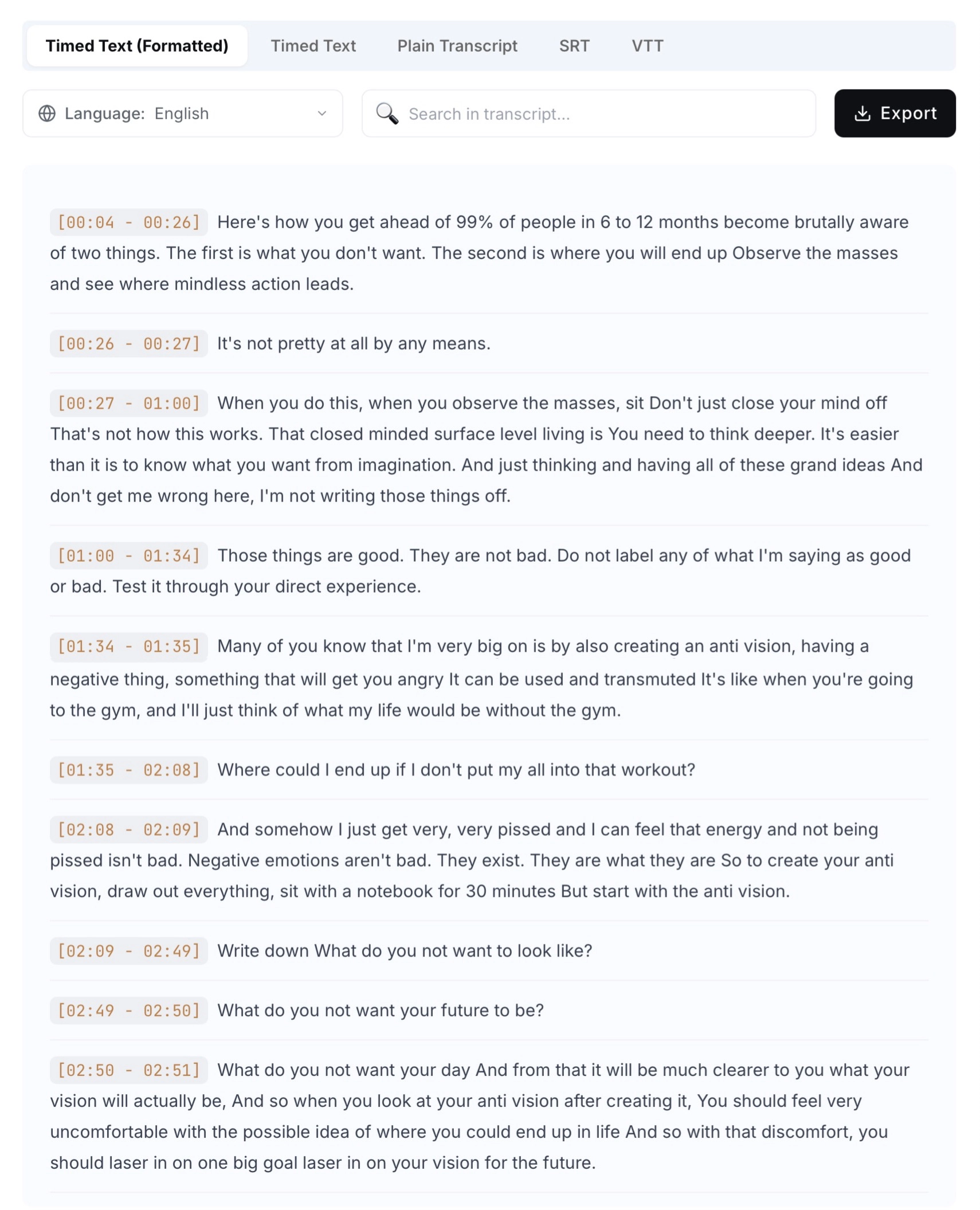
Raw YouTube Transcript (Noise)
Inspired by how Dan Koe studies long-form content—compressing hours of YouTube videos into reusable mental models.
Automated Dan Koe Workflow
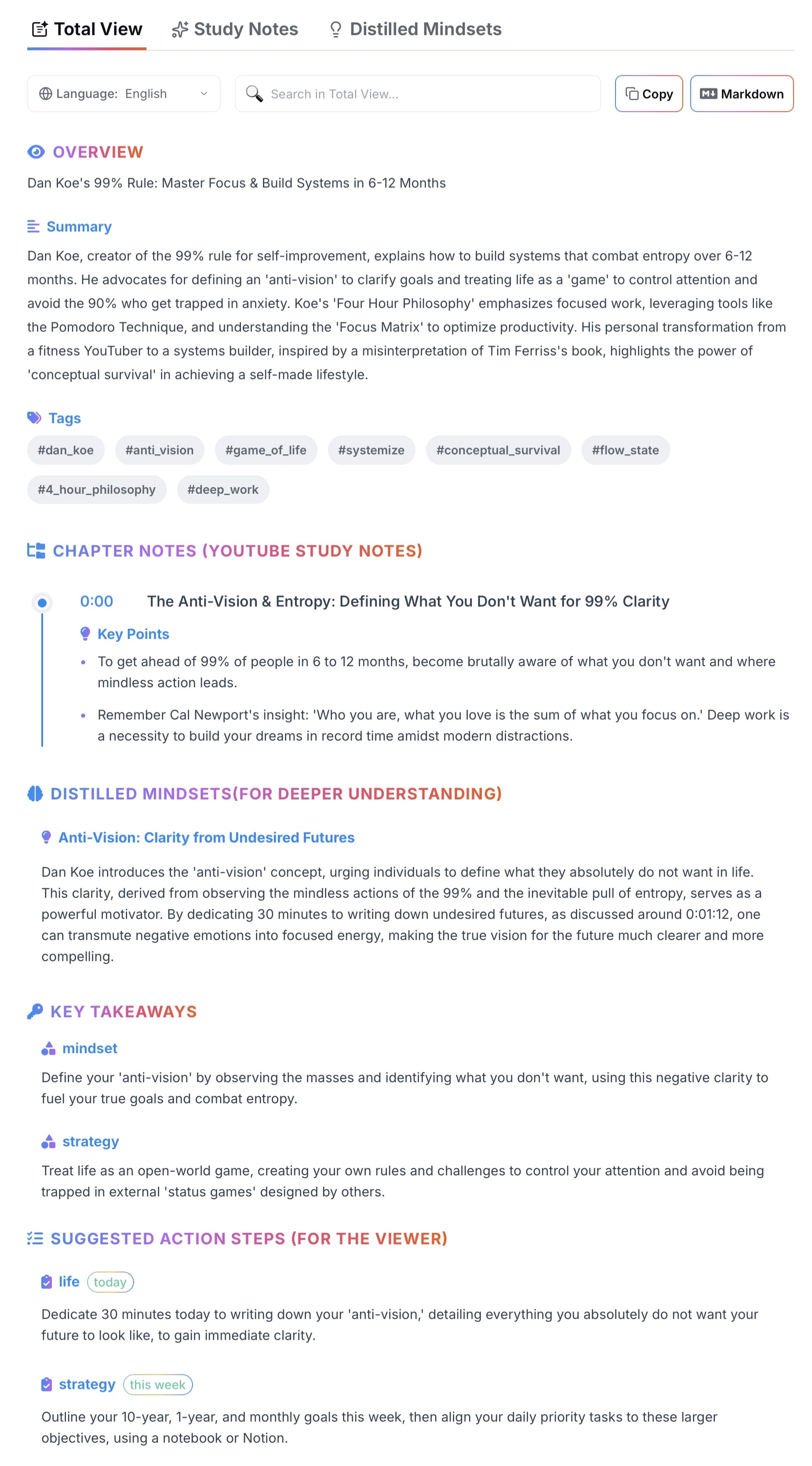
AI-Distilled YouTube Notes (Signal)
Clear overview, structured chapters, distilled mindsets, and action steps—built automatically from your YouTube transcript.
Get Instant YouTube Transcripts for Free
Generate precise, timestamped YouTube transcripts for any video length in seconds. No signup needed—your first 200 minutes are free.
AI Study Guides, Chapters Notes & Mindsets
Go beyond basic transcripts. Turn your YouTube transcripts into structured study guides with clear chapters, distilled mindsets, and actionable plans you can actually use.
AI Mind Maps & Notion / Markdown Export
Visualize how ideas connect with AI-generated mind maps, then export your transcripts and notes as PDF or Markdown—or send them straight into Notion for long-term knowledge management.
How to Extract YouTube Transcripts & Insights — In 3 Simple Steps
From instant free extraction to structured AI Study Guides. See how TubeHub turns hours of video into minutes of reading using the automated "Dan Koe" workflow.
Step 1 — Paste URL & Get Instant Transcripts
Simply paste any YouTube video link and click “Get Transcript”. In seconds, you get a precise YouTube transcript with timestamps or plain text for any video length. It’s completely free, unlimited, and requires no signup.

Step 2 — Skim with AI Summaries or Dive Deep with Notes
First, click “AI Summary” to quickly check if a video is worth your time. Ready to learn? Switch to “AI YouTube Notes” to automatically distill 6 hours of content into Structured Chapters, Key Mental Models, and Action Steps. It’s the raw material for your brain—automating the heavy lifting of learning.

Step 3 — Visualize Logic & Export to Your Second Brain
Switch to the AI Mind Map view to see how ideas connect throughout the video. Finally, export your transcripts and notes as SRT/VTT for editing, or PDF/Markdown to send them straight into Notion for your long-term knowledge base.

Start Extracting Transcripts & Insights for Free
- No credit card required
- Unlimited free transcripts
- Sign up and process 200 minutes of video free
Loved by YouTube Transcript Users Worldwide
See how TubeHub.ai helps creators and learners distill noise into signal and turn hours of video into actionable knowledge.
"Started using TubeHub.ai to repurpose my long-form videos. I love how the AI organizes everything into clear Chapters and Key Points—it basically writes the blog outline for me. Already saving me several hours each week on content creation."
Alex M.
YouTuber
"I analyze competitor videos daily. Since finding TubeHub.ai, I've processed dozens of webinars. Instead of watching 2-hour presentations, I get the Study Guide and search for specific strategies. The AI summaries help me spot trends I might have missed."
Nathan Rodriguez
Content Marketer
"Processing interview videos used to take forever. Now I use the AI Notes to distill 2-hour interviews into actionable insights. It captures the nuance, not just the text. The batch processing feature makes the Pro subscription worth it."
S. Williams
Market Researcher
"Switched to TubeHub.ai from manual transcription. My workflow now: record video podcast, upload, get the transcript for show notes. What used to take 3 hours now takes 5 minutes. The blog generator formats everything well, though I still adjust the intro."
Marcus
Podcast Host
"The extraction is incredibly fast. Covering live tech events is much easier now—I grab the stream URL, get the transcript instantly, and publish quotes while others are still taking notes. It’s my secret weapon for breaking news."

Bella H.
Tech Blogger
"Using TubeHub.ai to turn my channel into course materials. The 'Distilled Mindsets' feature is a game-changer—it extracts the core concepts perfectly for my students. The mind maps are also brilliant for planning new modules."

Ben from Seattle
Course Creator
"Started using TubeHub.ai to repurpose my long-form videos. I love how the AI organizes everything into clear Chapters and Key Points—it basically writes the blog outline for me. Already saving me several hours each week on content creation."
Alex M.
YouTuber
"I analyze competitor videos daily. Since finding TubeHub.ai, I've processed dozens of webinars. Instead of watching 2-hour presentations, I get the Study Guide and search for specific strategies. The AI summaries help me spot trends I might have missed."
Nathan Rodriguez
Content Marketer
"Processing interview videos used to take forever. Now I use the AI Notes to distill 2-hour interviews into actionable insights. It captures the nuance, not just the text. The batch processing feature makes the Pro subscription worth it."
S. Williams
Market Researcher
"Switched to TubeHub.ai from manual transcription. My workflow now: record video podcast, upload, get the transcript for show notes. What used to take 3 hours now takes 5 minutes. The blog generator formats everything well, though I still adjust the intro."
Marcus
Podcast Host
"The extraction is incredibly fast. Covering live tech events is much easier now—I grab the stream URL, get the transcript instantly, and publish quotes while others are still taking notes. It’s my secret weapon for breaking news."
Bella H.
Tech Blogger
"Using TubeHub.ai to turn my channel into course materials. The 'Distilled Mindsets' feature is a game-changer—it extracts the core concepts perfectly for my students. The mind maps are also brilliant for planning new modules."
Ben from Seattle
Course Creator
AI Notes & TubeHub.ai FAQs
Stop Reading Raw Transcripts, Get AI-Structured Study Notes
Unlock structured chapter notes, mindsets, and the automated Dan Koe workflow. 200 free minutes.